
A complete Kafka guide for DevOps engineers covering patterns, DLQ, streams, CI/CD, security, and multi-region setup.

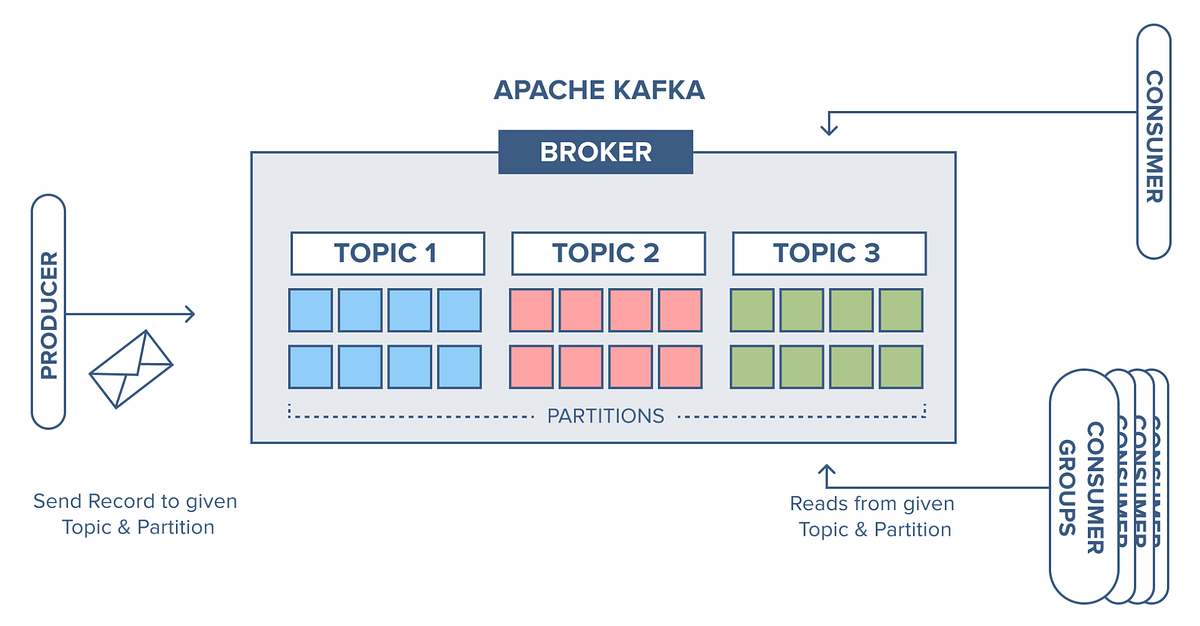
In today’s data-driven world, real-time processing has become a cornerstone for scalable and resilient systems. As organizations shift towards event-driven architectures, Apache Kafka has emerged as the de facto standard for building distributed streaming platforms. For DevOps engineers, understanding Kafka is no longer optional — it’s essential.
However, simply knowing Kafka concepts like topics, partitions, and brokers isn’t enough. To truly design reliable, scalable, and maintainable systems, you need to master Kafka design patterns.
In this blog, we’ll explore five critical Kafka design patterns every DevOps engineer should know. These patterns will help you design systems that are fault-tolerant, scalable, and efficient — while aligning with modern DevOps practices such as CI/CD, observability, and automation.
Why Kafka Design Patterns Matter for DevOps Engineers
Before diving into patterns, let’s understand why they matter.
DevOps engineers are responsible for:
Ensuring system reliability and uptime
Designing scalable infrastructure
Automating deployments and pipelines
Monitoring and troubleshooting distributed systems
Kafka plays a central role in all of these. Poor Kafka design leads to:
Data loss
System bottlenecks
Increased latency
Complex debugging
Design patterns provide proven solutions to recurring problems, helping you:
Reduce system complexity
Improve resilience
Optimize performance
Standardize architecture
Pattern 1: Event Sourcing
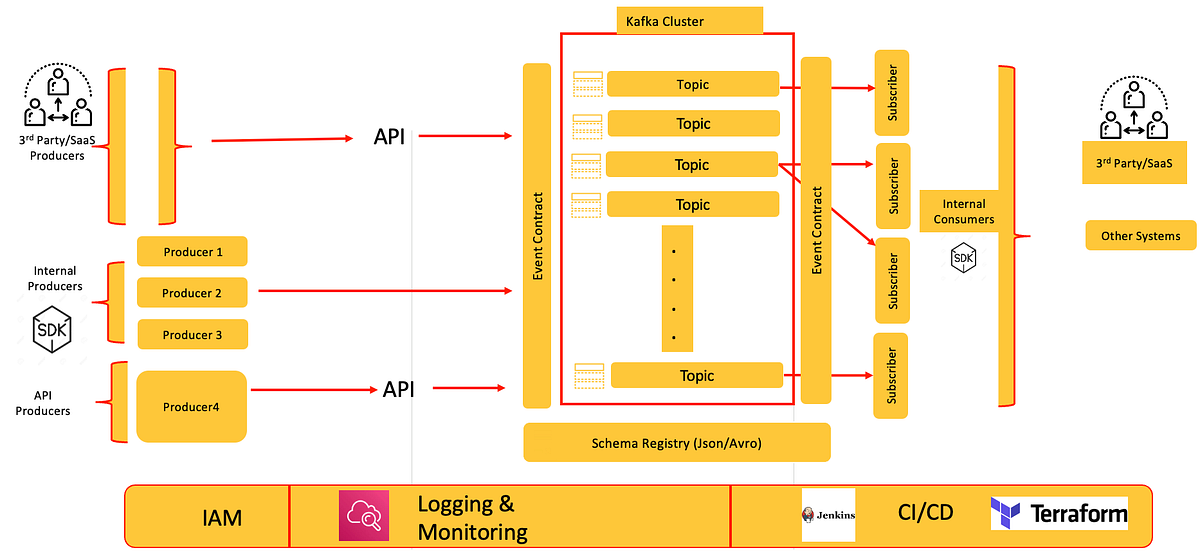
What is Event Sourcing?
Event sourcing is a pattern where state changes are stored as a sequence of events, rather than storing only the current state.
Instead of storing:
Current Balance = ₹10,000You store:
+5000 (deposit)
-2000 (withdrawal)
+7000 (deposit)
Kafka acts as the immutable event log.
How It Works with Kafka
Each event is published to a Kafka topic
Consumers rebuild state by replaying events
Kafka retains events for a configurable duration
Benefits
Complete audit trail
Easy debugging (replay events)
Strong data consistency
Time-travel capability
DevOps Perspective
For DevOps engineers, event sourcing enables:
Easier rollback (replay events)
Improved observability
Disaster recovery through log replay
Real-World Use Case
Banking systems
Order management systems
Inventory tracking
Challenges
Increased storage requirements
Complex schema evolution
Requires careful event design
Best Practices
Use schema registry (e.g., Avro/Protobuf)
Maintain backward compatibility
Monitor topic retention policies
Pattern 2: Publish-Subscribe (Pub/Sub)
What is Pub/Sub?
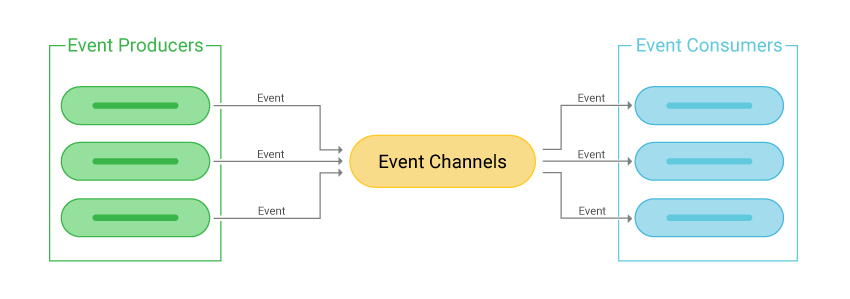
The Publish-Subscribe pattern allows multiple consumers to independently consume the same stream of data.
How It Works in Kafka
Producers publish messages to a topic
Multiple consumer groups subscribe to the same topic
Each group receives all messages independently
Example
A single event (e.g., “Order Created”) can be consumed by:
Billing service
Notification service
Analytics service
Benefits
Loose coupling
High scalability
Independent service evolution
DevOps Perspective
Enables microservices architecture
Simplifies deployments
Supports independent scaling of services
Challenges
Managing consumer lag
Ensuring message ordering
Handling duplicate messages
Best Practices
Use consumer groups effectively
Monitor lag using metrics
Implement idempotent consumers
Pattern 3: Stream Processing (Kafka Streams / KSQL)
What is Stream Processing?
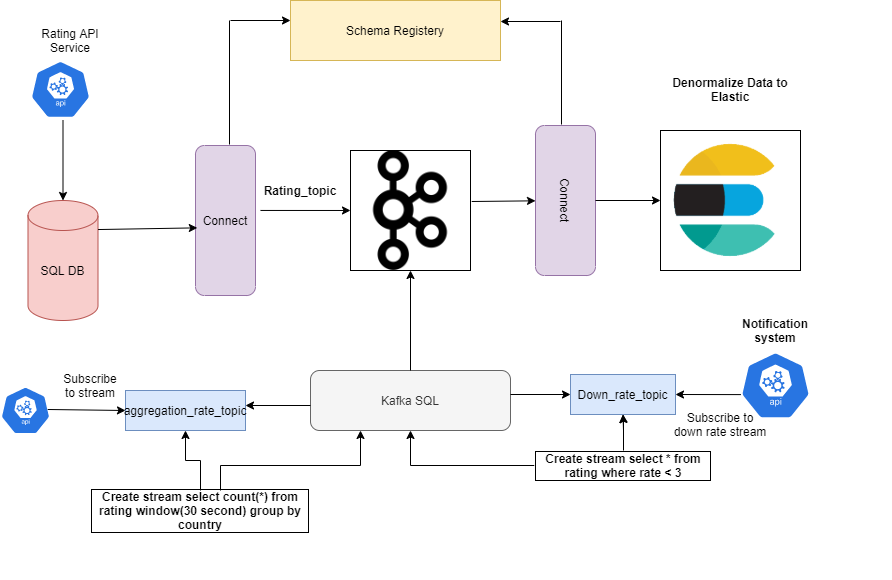
Stream processing involves processing data in real-time as it flows through Kafka.
How It Works
Data flows through Kafka topics
Processing happens using Kafka Streams or KSQL
Results are written to new topics
Example
Filtering logs
Aggregating metrics
Fraud detection
Benefits
Real-time insights
Reduced latency
Eliminates need for batch processing
DevOps Perspective
Reduces infrastructure complexity
Integrates with CI/CD pipelines
Easier scaling compared to batch jobs
Challenges
Stateful processing complexity
Debugging distributed streams
Managing state stores
Best Practices
Use windowing for aggregations
Ensure fault-tolerant state stores
Monitor throughput and latency
Pattern 4: Dead Letter Queue (DLQ)
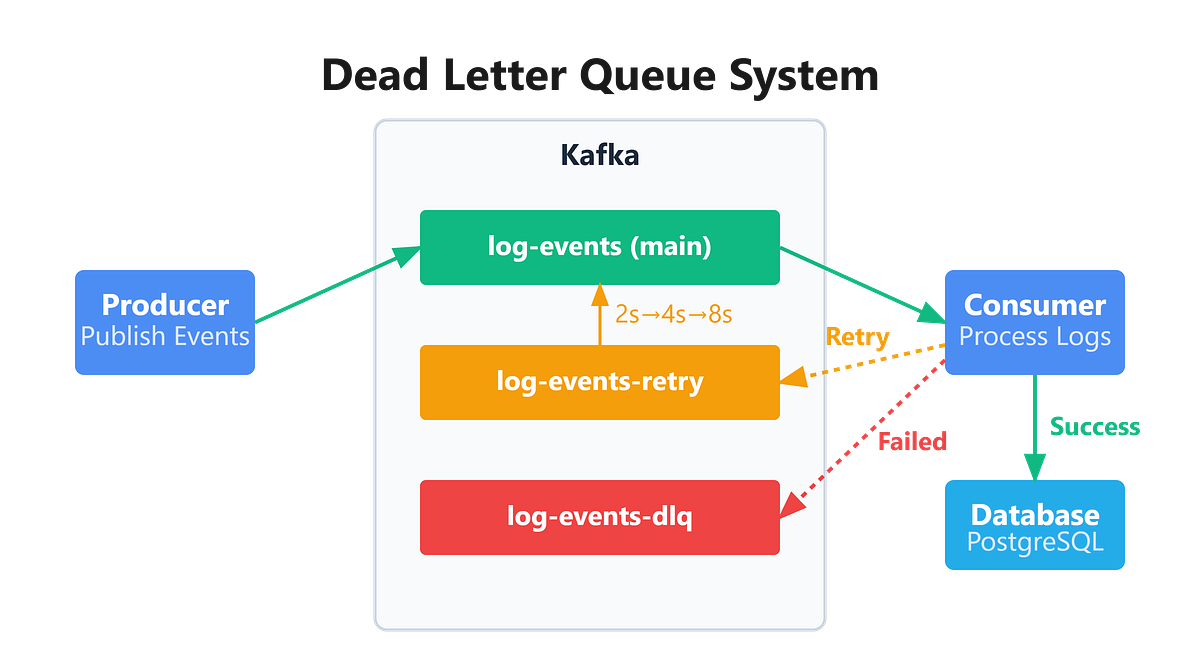
What is a Dead Letter Queue?
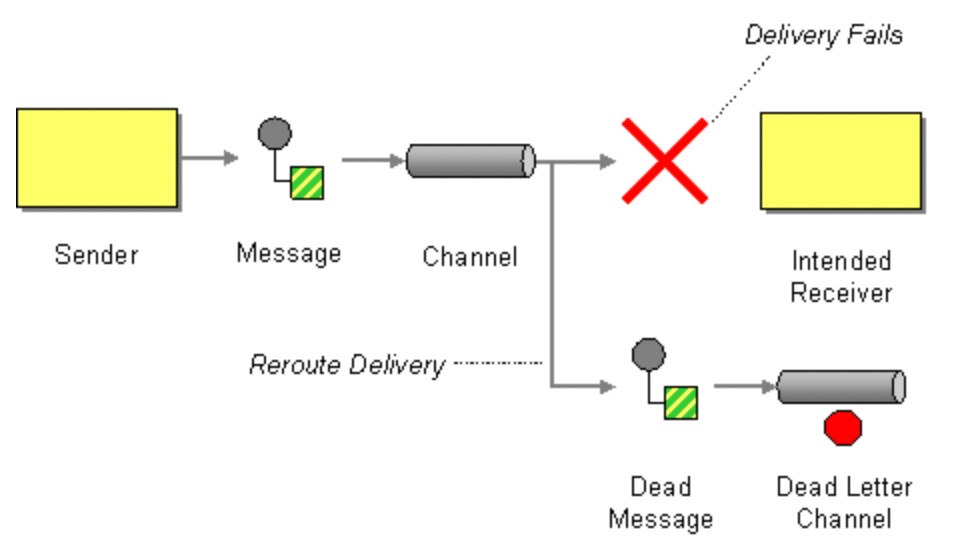
A Dead Letter Queue is used to capture messages that fail processing.
How It Works
Consumer fails to process a message
Message is redirected to a DLQ topic
Engineers analyze and reprocess later
Benefits
Prevents pipeline failures
Enables debugging of bad data
Improves system resilience
DevOps Perspective
Critical for production stability
Helps in incident management
Supports automated recovery workflows
Real-World Use Case
Invalid JSON messages
Schema mismatches
Downstream service failures
Challenges
DLQ monitoring
Reprocessing strategy
Avoiding infinite retry loops
Best Practices
Set retry limits
Use alerting for DLQ growth
Build reprocessing pipelines
Pattern 5: Exactly-Once Processing
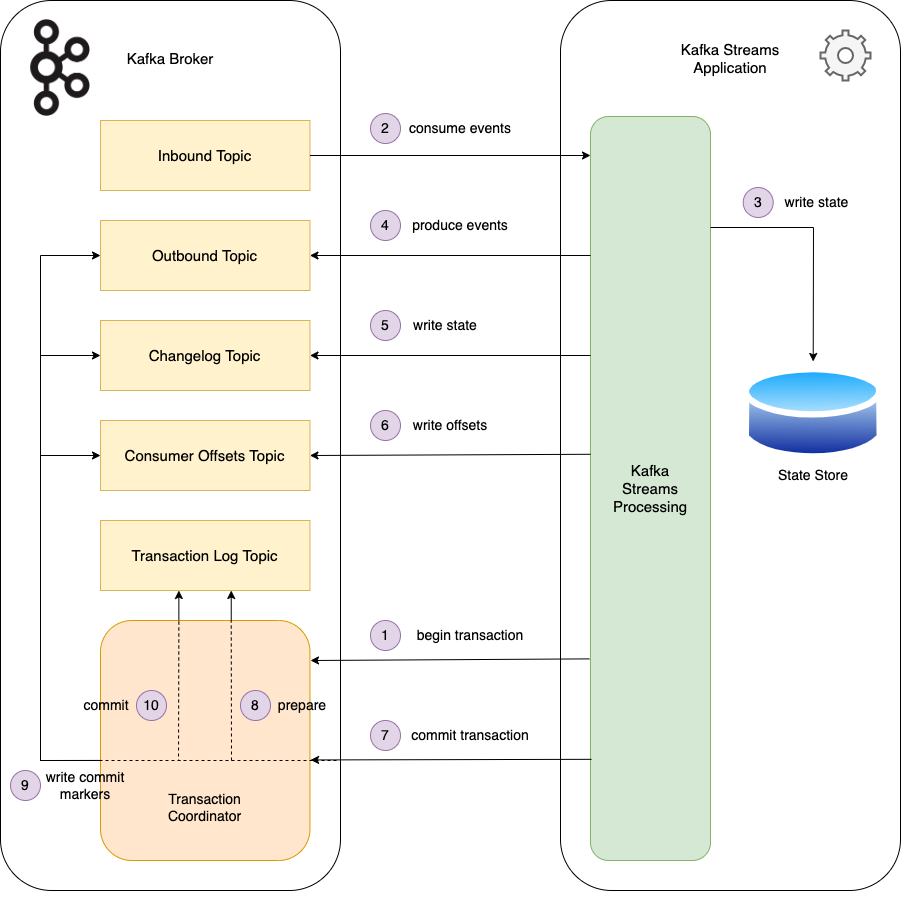
What is Exactly-Once Semantics?
Exactly-once ensures that each message is processed only once, even in failures.
Why It Matters
Without this:
Duplicate processing
Data inconsistency
Financial errors
How Kafka Supports It
Idempotent producers
Transactions
Offset management
Benefits
Strong data integrity
Reliable processing
Critical for financial systems
DevOps Perspective
Reduces operational issues
Simplifies debugging
Ensures consistency across systems
Challenges
Performance overhead
Complex configuration
Requires careful implementation
Best Practices
Enable idempotence
Use transactional producers
Monitor transaction timeouts
How These Patterns Work Together
These patterns are not isolated — they often work together:
Event sourcing + stream processing → real-time analytics
Pub/Sub + DLQ → resilient microservices
Exactly-once + event sourcing → reliable financial systems
A mature Kafka architecture combines multiple patterns to achieve:
Scalability
Fault tolerance
Observability
Common Mistakes DevOps Engineers Should Avoid
1. Ignoring Partition Strategy
Poor partitioning leads to:
Uneven load distribution
Performance bottlenecks
2. Not Monitoring Consumer Lag
Lag can cause:
Delayed processing
System failures
3. Mismanaging Retention Policies
Too short → data loss
Too long → storage issues
4. Skipping Schema Management
Leads to:
Breaking changes
Data incompatibility
5. Overcomplicating Architecture
Start simple, then scale
Tools Every DevOps Engineer Should Use with Kafka
Kafka Manager / Cruise Control
Prometheus + Grafana
Schema Registry
Kafka Connect
KSQL / Kafka Streams
CI/CD and Kafka: To integrate Kafka into DevOps workflows:
Automate:
Topic creation
ACL configurations
Schema deployments
Use Infrastructure as Code:
Terraform for Kafka clusters
Helm charts for Kubernetes deployments
Monitor:
Broker health
Throughput
Latency
Consumer lag
Observability in Kafka Systems
Key metrics to track:
Message throughput
Consumer lag
Partition distribution
Broker CPU and memory
Use:
Distributed tracing
Centralized logging
Alerting systems
Future Trends in Kafka for DevOps
Serverless Kafka
Managed Kafka services
AI-driven anomaly detection
Multi-cluster replication
Example: Building a Resilient Order Processing System with Kafka
To truly understand how these Kafka design patterns work, let’s walk through a real-world DevOps-friendly example — an Order Processing System used in an e-commerce platform.
This example combines multiple Kafka patterns:
Publish-Subscribe
Dead Letter Queue (DLQ)
Exactly-Once Processing
Stream Processing (optional enhancement)
Architecture Overview
When a user places an order:
Order Service publishes an event →
orders-topicMultiple services consume it:
Payment Service
Inventory Service
Notification Service
Failed messages go to →
orders-dlqExactly-once ensures no duplicate orders
Step 1: Kafka Producer (Order Service)
This service publishes order events.
from kafka import KafkaProducer
import json
producer = KafkaProducer
(
bootstrap_servers=’localhost:9092’,
value_serializer=lambda v: json.dumps(v).encode(’utf-8’),
acks=’all’, # ensure durability
retries=5
)order_event =
{
“order_id”: “ORD123”,
“user_id”: “USER1”,
“amount”: 2500,
“status”: “CREATED”
}producer.send(’orders-topic’, value=order_event)
producer.flush()print(”Order event published successfully”)Explanation
acks='all'→ ensures message durability across replicasretries=5→ improves reliabilityJSON serialization → standard message format
Pattern Used: Publish-Subscribe
Step 2: Kafka Consumer (Payment Service)
This service processes payments.
from kafka import KafkaConsumer
import json
consumer = KafkaConsumer
(
‘orders-topic’,
bootstrap_servers=’localhost:9092’,
group_id=’payment-group’,
value_deserializer=lambda x: json.loads(x.decode(’utf-8’)),
enable_auto_commit=False # manual commit for reliability
)for message in consumer:
order = message.value
try:
print(f”Processing payment for {order[’order_id’]}”) # Simulate payment processing
if order[’amount’] <= 0:
raise Exception(”Invalid amount”) # Commit offset only after success
consumer.commit() except Exception as e:
print(f”Error: {e}”)Explanation
Manual offset commit ensures at-least-once / exactly-once control
Failures are captured and handled
Pattern Used: Exactly-Once (controlled via commits)
Step 3: Dead Letter Queue (DLQ Implementation)
Failed messages are redirected to a DLQ topic.
from kafka import KafkaProducerdlq_producer = KafkaProducer(
bootstrap_servers=’localhost:9092’,
value_serializer=lambda v: json.dumps(v).encode(’utf-8’)
)def send_to_dlq(order, error):
dlq_event = {
“failed_order”: order,
“error”: str(error)
}
dlq_producer.send(’orders-dlq’, value=dlq_event)
dlq_producer.flush()Modify consumer error block:
except Exception as e:
    send_to_dlq(order, e)
Explanation
Prevents pipeline breakdown
Stores failed events for debugging/reprocessing
Pattern Used: Dead Letter Queue (DLQ)
Step 4: Adding Idempotency (Exactly-Once Enhancement)
To avoid duplicate processing:
processed_orders = set()if order[’order_id’] in processed_orders:
print(”Duplicate event detected, skipping...”)
else:
processed_orders.add(order[’order_id’])
# process orderExplanation
Ensures idempotent consumer behavior
Prevents duplicate charges/orders
Pattern Used: Exactly-Once Processing
Step 5: Stream Processing (Optional Enhancement)
You can process real-time analytics using Kafka Streams or Python-based consumers:
# Example: Count total revenue
total_revenue = 0
for message in consumer:
order = message.value
total_revenue += order[’amount’]
print(f”Total Revenue: {total_revenue}”)Explanation
Real-time aggregation
No need for batch jobs
Pattern Used: Stream Processing
Key Takeaways from This Example
Loose coupling: Multiple services consume independently
Fault tolerance: DLQ prevents system failure
Data integrity: Exactly-once avoids duplicates
Scalability: Consumer groups scale horizontally
DevOps Insights
From a DevOps perspective, this system enables:
Easy scaling using consumer groups
Observability via logs and metrics
CI/CD integration for producers/consumers
Automated recovery using DLQ pipelines
In production:
Replace local Kafka with managed Kafka (Confluent / MSK / Azure Event Hubs)
Use Schema Registry for compatibility
Implement monitoring (Prometheus + Grafana)
Secure with ACLs and TLS
This example gives you a hands-on blueprint to implement Kafka design patterns in real-world systems — something that directly aligns with modern DevOps responsibilities.
Kafka Deployment Setup
Local setup (Docker Compose) → for development
Production setup (Terraform + Azure) → for real-world use
CI/CD integration ideas
1. Local Kafka Setup (Docker Compose)
This is perfect for:
Testing patterns
Running your Python/Java services
Debugging pipelines
docker-compose.yml
version: ‘3.8’services:
zookeeper:
image: confluentinc/cp-zookeeper:7.5.0
container_name: zookeeper
environment:
ZOOKEEPER_CLIENT_PORT: 2181
ZOOKEEPER_TICK_TIME: 2000 kafka:
image: confluentinc/cp-kafka:7.5.0
container_name: kafka
depends_on:
- zookeeper
ports:
- “9092:9092”
environment:
KAFKA_BROKER_ID: 1
KAFKA_ZOOKEEPER_CONNECT: zookeeper:2181
KAFKA_ADVERTISED_LISTENERS: PLAINTEXT://localhost:9092
KAFKA_OFFSETS_TOPIC_REPLICATION_FACTOR: 1Run Kafka
docker-compose up -dCreate Topic
docker exec -it kafka kafka-topics \
  --create \
  --topic orders-topic \
  --bootstrap-server localhost:9092 \
  --partitions 3 \
  --replication-factor 1
Verify
docker exec -it kafka kafka-topics \
  --list \
  --bootstrap-server localhost:9092
2. Production Setup (Terraform on Azure)
Since you’re working with Azure + Terraform, this is highly relevant.
We’ll use:
Azure Event Hubs (Kafka-compatible)
Terraform IaC
Terraform Structure
kafka-azure/
│
├── main.tf
├── variables.tf
├── outputs.tf
main.tf
provider “azurerm” {
  features {}
}
resource “azurerm_resource_group” “rg” {
name = “kafka-rg”
location = “East US”
}resource “azurerm_eventhub_namespace” “namespace” {
name = “kafka-namespace-demo”
location = azurerm_resource_group.rg.location
resource_group_name = azurerm_resource_group.rg.name
sku = “Standard”
capacity = 1 kafka_enabled = true
}resource “azurerm_eventhub” “eventhub” {
name = “orders-topic”
namespace_name = azurerm_eventhub_namespace.namespace.name
resource_group_name = azurerm_resource_group.rg.name
partition_count = 2
message_retention = 1
}Deploy
terraform init
terraform plan
terraform apply
Connection (Kafka Endpoint)
Azure Event Hub Kafka endpoint:
<namespace>.servicebus.windows.net:9093Use this in your app:
bootstrap_servers=”namespace.servicebus.windows.net:9093”3. CI/CD Integration
Example: GitHub Actions
name: Kafka Infra Deployon:
push:
branches:
- mainjobs:
terraform:
runs-on: ubuntu-latest steps:
- name: Checkout
uses: actions/checkout@v3 - name: Setup Terraform
uses: hashicorp/setup-terraform@v2 - name: Init
run: terraform init - name: Apply
run: terraform apply -auto-approve4. Monitoring Setup
Recommended Stack
Prometheus → Metrics
Grafana → Dashboards
Kafka Exporter → Kafka metrics
Example Metrics to Track
Consumer lag
Broker CPU/memory
Throughput (messages/sec)
Partition skew
5. Production Best Practices
Reliability
Replication factor ≥ 3
Min ISR configured
Security
Enable TLS
Use SASL authentication
Scaling
Partition strategy planning
Horizontal consumer scaling
1. Dead Letter Queue (DLQ) Implementation
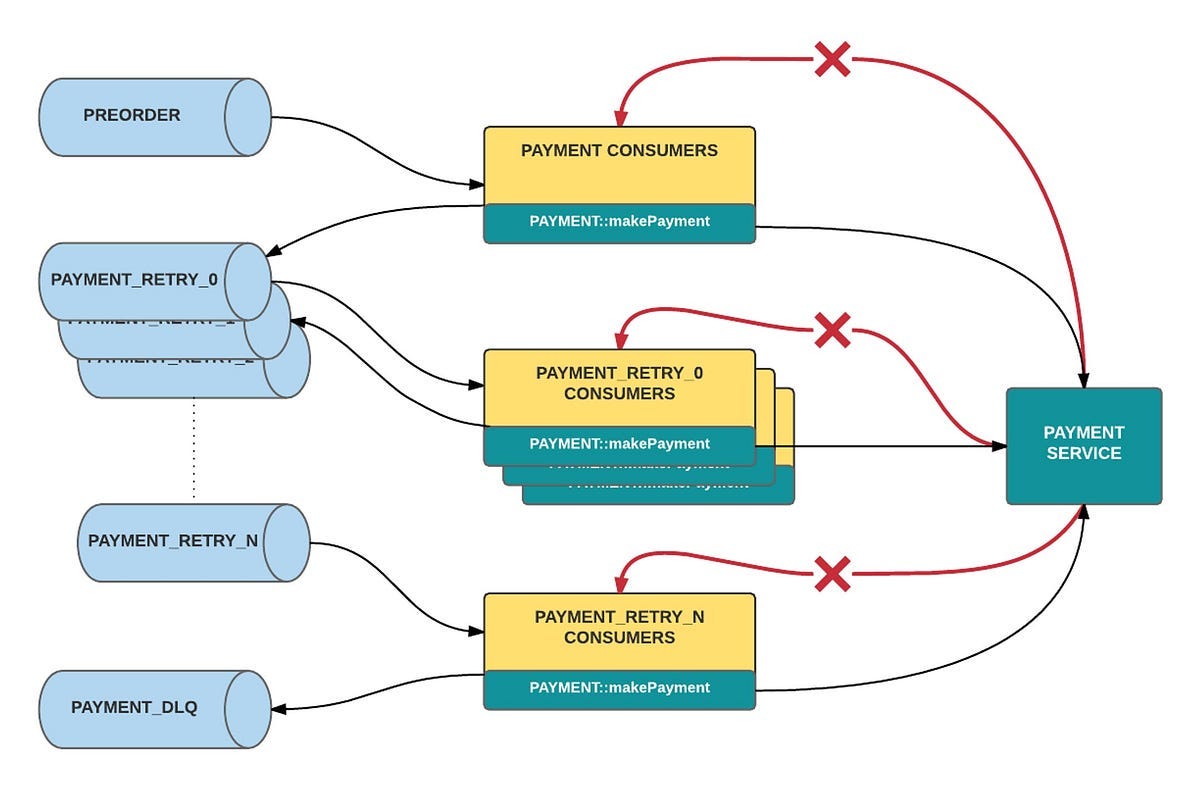
Architecture Flow
Create DLQ Topic
kafka-topics --create \
  --topic orders-dlq \
  --bootstrap-server localhost:9092 \
  --partitions 3 \
  --replication-factor 1
Consumer with Retry + DLQ
from kafka import KafkaConsumer, KafkaProducer
import json
import time
consumer = KafkaConsumer(
‘orders-topic’,
bootstrap_servers=’localhost:9092’,
group_id=’order-group’,
value_deserializer=lambda x: json.loads(x.decode(’utf-8’)),
enable_auto_commit=False
)dlq_producer = KafkaProducer(
bootstrap_servers=’localhost:9092’,
value_serializer=lambda v: json.dumps(v).encode(’utf-8’)
)MAX_RETRIES = 3def process_order(order):
if order[’amount’] <= 0:
raise Exception(”Invalid order amount”)for message in consumer:
order = message.value
retries = order.get(”retries”, 0) try:
process_order(order)
consumer.commit() except Exception as e:
if retries < MAX_RETRIES:
order[”retries”] = retries + 1
time.sleep(1)
dlq_producer.send(”orders-topic”, value=order)
else:
dlq_producer.send(”orders-dlq”, value={
“order”: order,
“error”: str(e)
})
consumer.commit()What This Solves
Prevents pipeline crashes
Captures bad data
Enables reprocessing workflows
2. Kafka Streams Service
Stream Processing Flow
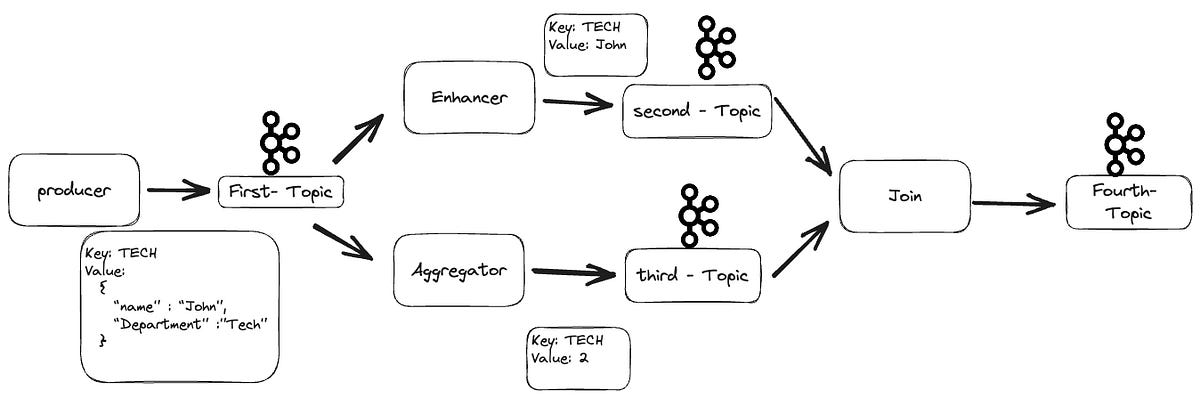
Example: Real-Time Revenue Aggregation
import org.apache.kafka.streams.KafkaStreams;
import org.apache.kafka.streams.StreamsBuilder;
import org.apache.kafka.streams.kstream.KStream;
import java.util.Properties;
public class OrderStreamApp {
public static void main(String[] args) { Properties props = new Properties();
props.put(”application.id”, “order-stream-app”);
props.put(”bootstrap.servers”, “localhost:9092”); StreamsBuilder builder = new StreamsBuilder(); KStream<String, String> orders = builder.stream(”orders-topic”); orders.foreach((key, value) -> {
System.out.println(”Processing order: “ + value);
}); KafkaStreams streams = new KafkaStreams(builder.build(), props);
streams.start();
}
}Advanced (Aggregation)
orders
  .groupByKey()
  .count()
  .toStream()
  .foreach((k, v) -> System.out.println(”Order Count: “ + v));
3. CI/CD Pipeline (Visual + YAML)
Pipeline Flow
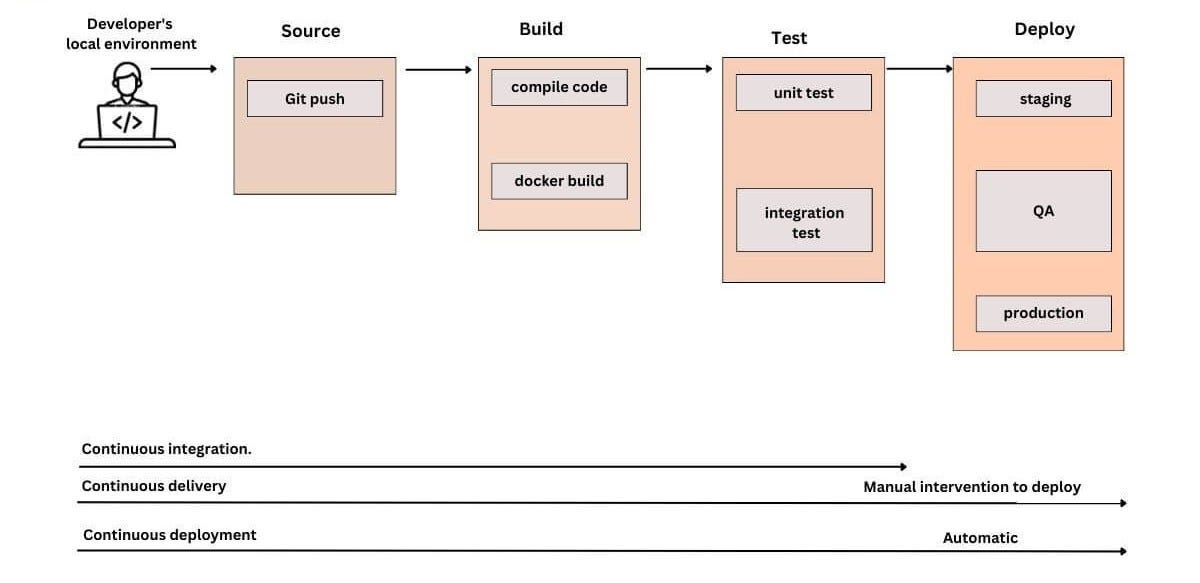
GitHub Actions (End-to-End)
name: Kafka DevOps Pipelineon:
push:
branches: [main]jobs:
build-deploy:
runs-on: ubuntu-latest steps:
- name: Checkout
uses: actions/checkout@v3 - name: Build App
run: |
echo “Building Kafka services...”
# mvn clean install OR pip install - name: Run Tests
run: |
echo “Running tests...” - name: Terraform Init
run: terraform init - name: Terraform Apply
run: terraform apply -auto-approve - name: Deploy Docker Services
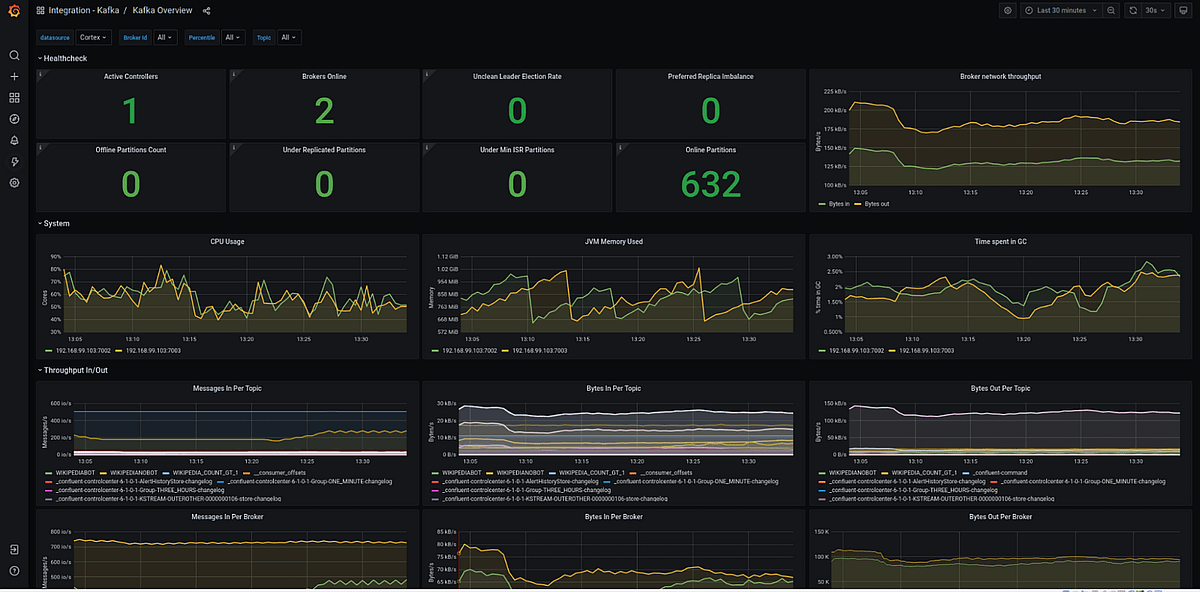
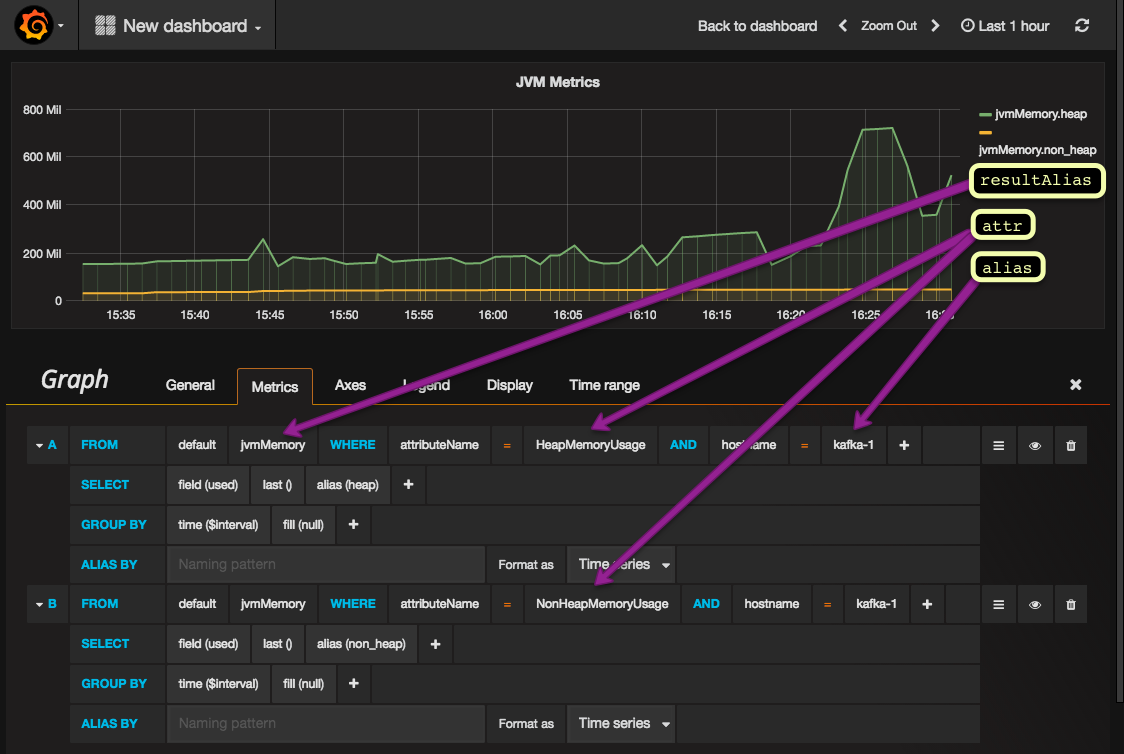
run: docker-compose up -d4. Kafka Observability Dashboard
Docker Setup (Monitoring Stack)
version: ‘3’services:
prometheus:
image: prom/prometheus
ports:
- “9090:9090” grafana:
image: grafana/grafana
ports:
- “3000:3000”Key Metrics to Track
Critical Metrics
Consumer Lag
Message Throughput
Broker Health
Partition Distribution
Example Prometheus Query
kafka_consumergroup_lagGrafana Panels to Create
Messages/sec (throughput)
Consumer lag per group
roker memory & CPU
Failed messages (DLQ rate)
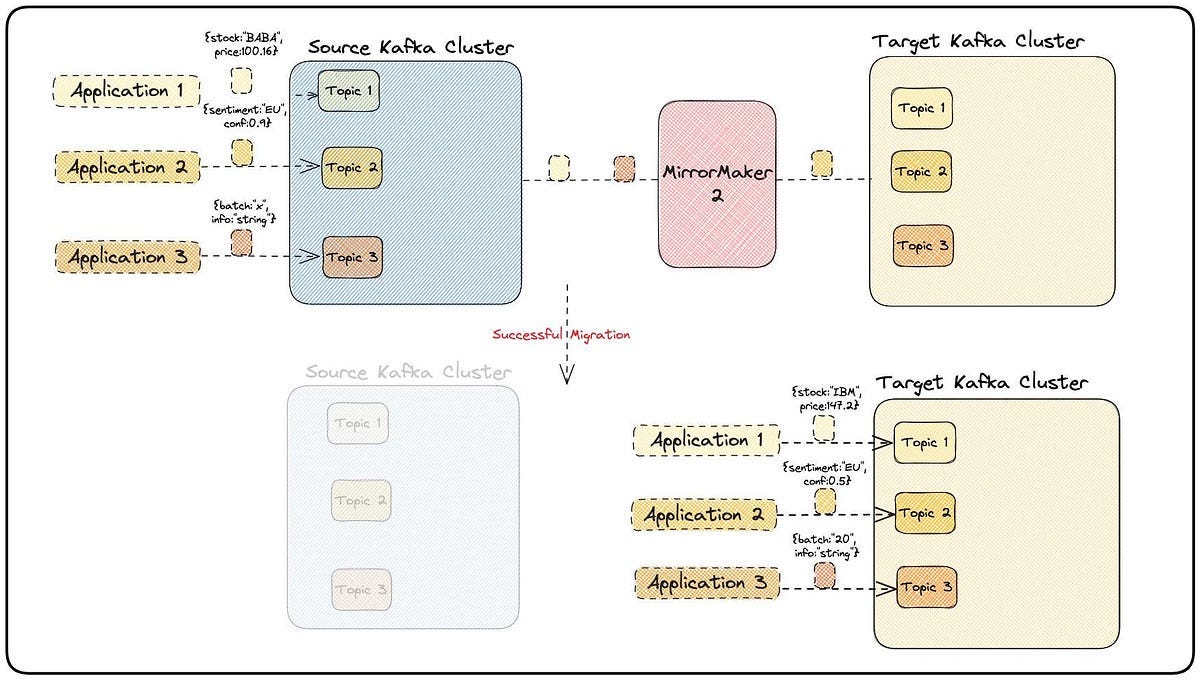
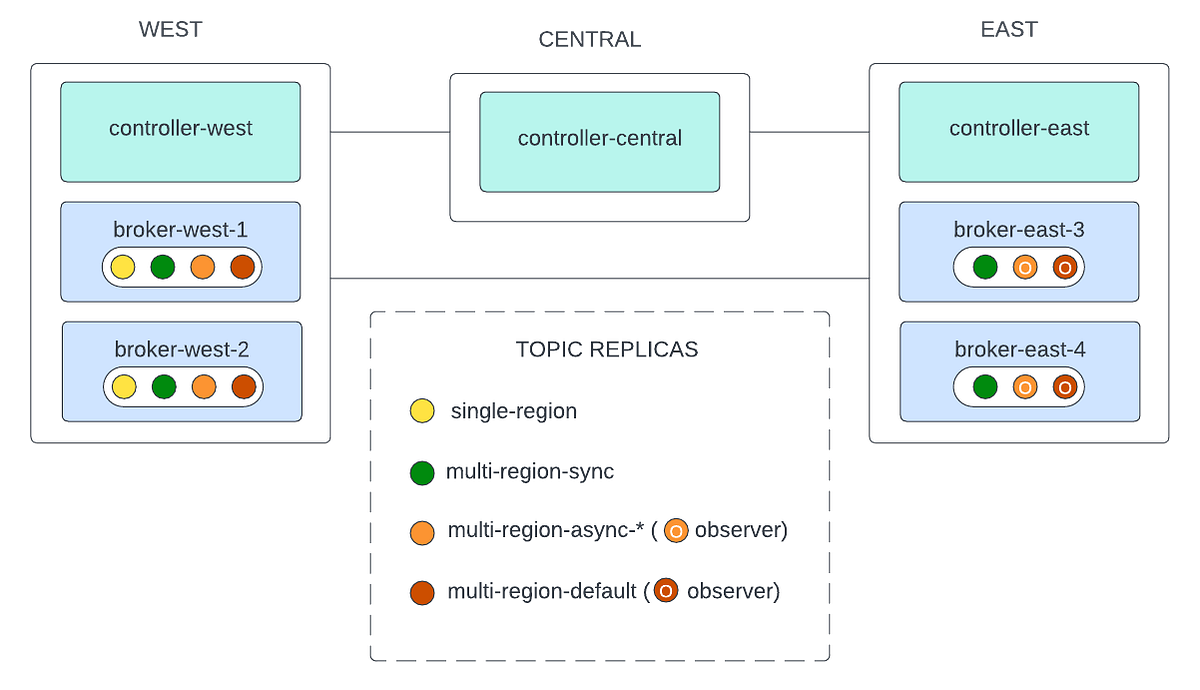
Multi-Region Kafka with MirrorMaker 2
Architecture Overview
What is MirrorMaker 2?
MirrorMaker 2 (MM2) is a Kafka-based tool used for:
Replicating topics across Kafka clusters
Enabling disaster recovery (DR)
Supporting geo-distributed applications
It’s built on Kafka Connect framework, making it scalable and fault tolerant.
Use Cases
Disaster Recovery (Active-Passive)
Primary cluster → secondary backup cluster
Failover during outages
Active-Active (Multi-Region)
Both clusters serve traffic
Data replicated both ways
Data Locality
Serve users from nearest region
Reduce latency
1. Prerequisites
You need:
2 Kafka clusters
clusterA(primary)clusterB(secondary)Network connectivity between them
Kafka Connect enabled
2. Docker Setup (Two Clusters + MM2)
docker-compose (Simplified Multi-Cluster)
version: ‘3.8’services: zookeeper-a:
image: confluentinc/cp-zookeeper:7.5.0
environment:
ZOOKEEPER_CLIENT_PORT: 2181 kafka-a:
image: confluentinc/cp-kafka:7.5.0
ports:
- “9092:9092”
environment:
KAFKA_ZOOKEEPER_CONNECT: zookeeper-a:2181
KAFKA_ADVERTISED_LISTENERS: PLAINTEXT://localhost:9092 zookeeper-b:
image: confluentinc/cp-zookeeper:7.5.0
environment:
ZOOKEEPER_CLIENT_PORT: 2182 kafka-b:
image: confluentinc/cp-kafka:7.5.0
ports:
- “9093:9093”
environment:
KAFKA_ZOOKEEPER_CONNECT: zookeeper-b:2182
KAFKA_ADVERTISED_LISTENERS: PLAINTEXT://localhost:90933. MirrorMaker 2 Configuration
mm2.properties
clusters = A, BA.bootstrap.servers = kafka-a:9092
B.bootstrap.servers = kafka-b:9093# Enable replication from A → B
A->B.enabled = true# Topics to replicate
A->B.topics = orders-topic# Replication policy
replication.policy.class=org.apache.kafka.connect.mirror.DefaultReplicationPolicy# Sync configs
sync.topic.configs.enabled = true
sync.group.offsets.enabled = true# Replication factor
replication.factor=1Run MirrorMaker 2
connect-mirror-maker.sh mm2.properties4. What Happens Internally?
Topic
orders-topicin Cluster A ➡ replicated toA.orders-topicin Cluster B
5. Test Replication
Produce in Cluster A
kafka-console-producer \
  --bootstrap-server localhost:9092 \
  --topic orders-topic
Consume in Cluster B
kafka-console-consumer \
  --bootstrap-server localhost:9093 \
  --topic A.orders-topic \
  --from-beginning
Active-Active Setup (Advanced)
To enable bi-directional replication:
A->B.enabled = true
B->A.enabled = true
Challenge: Infinite Loops
MM2 avoids loops using:
Replication policy prefix (
A./B.)Internal topic tracking
7. Failover Strategy
Scenario: Cluster A Down
Step 1: Switch Producer
bootstrap_servers=”localhost:9093”Step 2: Use Replicated Topic
A.orders-topicAutomate Failover
Use:
DNS failover
Load balancer
Service mesh (Istio)
8. Monitoring Mirror Maker
Key Metrics
Replication lag
Throughput
Failed syncs
Prometheus Metrics Example
kafka_connect_mirror_source_record_lag_maxMirrorMaker 2 transforms Kafka from a single-cluster system into a globally distributed streaming platform.
You now have:
Multi-region Kafka
DR-ready architecture
Active-active capability
Real-world DevOps design
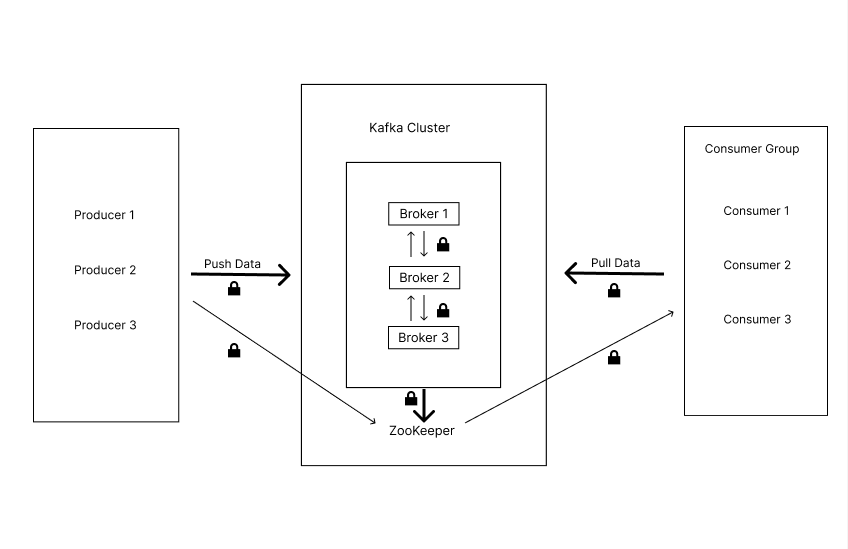
Secure Kafka Architecture
1. TLS Encryption (Secure Communication)
Why TLS?
Without TLS:
Data is sent in plain text
Vulnerable to MITM attacks
With TLS:
Encryption in transit
Server authentication
Optional client authentication (mTLS)
Step 1: Generate Certificates
# Create CA
openssl req -new -x509 -keyout ca-key -out ca-cert -days 365
# Create broker keystore
keytool -genkey -keystore kafka.keystore.jks -alias kafka# Create CSR
keytool -keystore kafka.keystore.jks -alias kafka -certreq -file cert-file# Sign certificate
openssl x509 -req -CA ca-cert -CAkey ca-key -in cert-file -out cert-signed# Import CA + signed cert
keytool -keystore kafka.keystore.jks -alias CARoot -import -file ca-cert
keytool -keystore kafka.keystore.jks -alias kafka -import -file cert-signedStep 2: Configure Kafka Broker
listeners=SSL://:9093
advertised.listeners=SSL://localhost:9093
ssl.keystore.location=/etc/kafka/kafka.keystore.jks
ssl.keystore.password=changeit
ssl.key.password=changeitssl.truststore.location=/etc/kafka/kafka.truststore.jks
ssl.truststore.password=changeitStep 3: Secure Client
from kafka import KafkaProducerproducer = KafkaProducer
(
bootstrap_servers=’localhost:9093’,
security_protocol=”SSL”,
ssl_cafile=”ca-cert”,
ssl_certfile=”client-cert”,
ssl_keyfile=”client-key”
)Outcome
Encrypted communication
Secure client-server authentication
2. Kafka ACLs (Authorization)
Why ACLs?
ACLs ensure:
Only authorized users can produce/consume
Prevent unauthorized access
Enable ACLs in Broker
authorizer.class.name=kafka.security.authorizer.AclAuthorizer
super.users=User:admin
allow.everyone.if.no.acl.found=false
Add ACL Rules
Allow Producer
kafka-acls.sh \
  --authorizer-properties zookeeper.connect=localhost:2181 \
  --add \
  --allow-principal User:producer-user \
  --operation Write \
  --topic orders-topic
Allow Consumer
kafka-acls.sh \
  --authorizer-properties zookeeper.connect=localhost:2181 \
  --add \
  --allow-principal User:consumer-user \
  --operation Read \
  --topic orders-topic \
  --group order-group
Deny Access (Example)
kafka-acls.sh \
  --deny-principal User:unauthorized-user \
  --operation Read \
  --topic orders-topic
Outcome
Fine-grained access control
Principle of least privilege
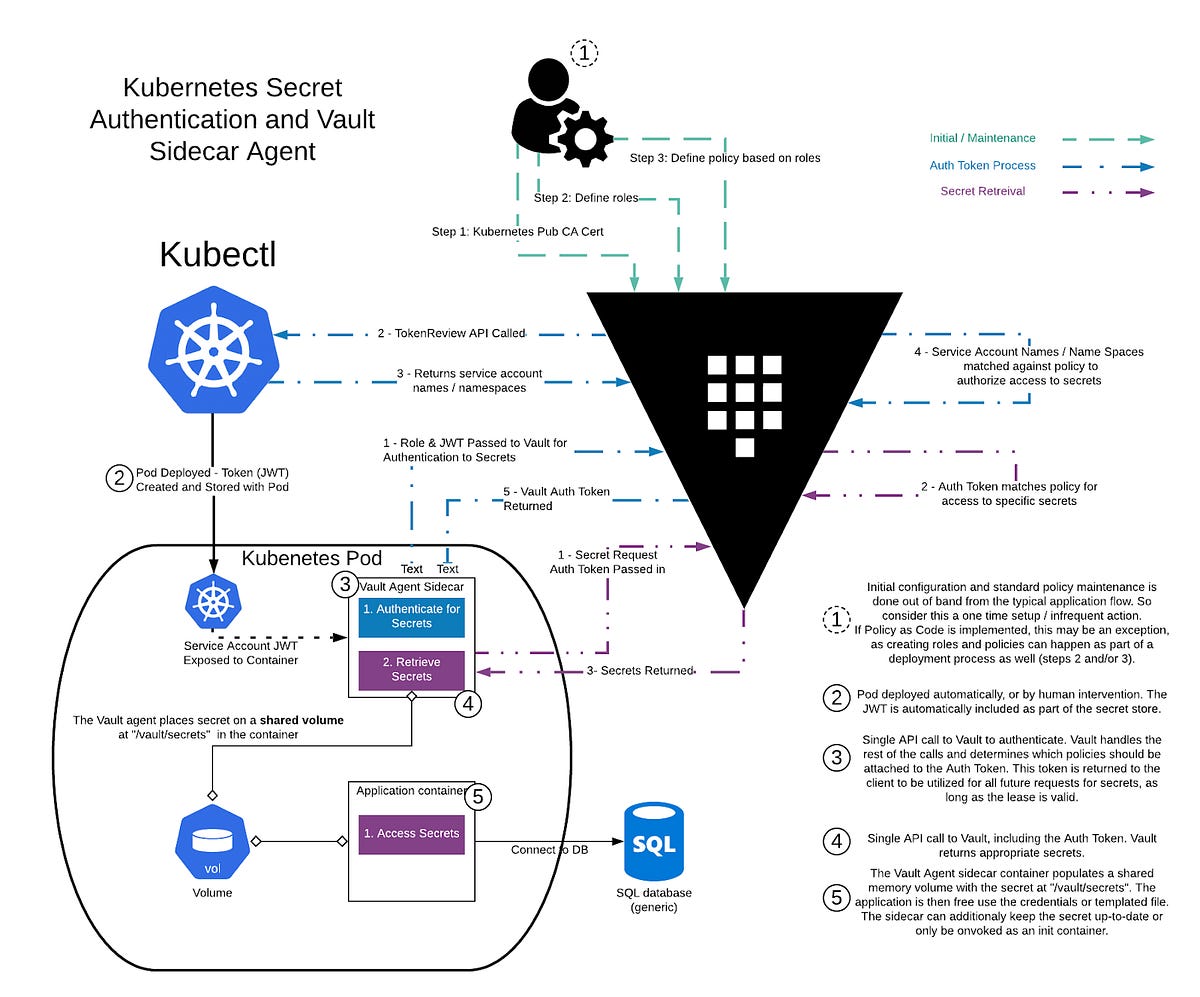
3. Secrets Management (Vault Integration)
Why Secrets Management?
Hardcoding secrets = No
Using Vault/KMS = Yes
Architecture
Option 1: Environment Variables (Basic)
export KAFKA_USERNAME=producer-user
export KAFKA_PASSWORD=secure-password
Option 2: HashiCorp Vault (Recommended)
Store Secret
vault kv put secret/kafka \
  username=producer-user \
  password=secure-password
Fetch Secret (App Side)
import hvacclient = hvac.Client(url=’http://127.0.0.1:8200’)
secret = client.secrets.kv.read_secret_version(path=’kafka’)username = secret[’data’][’data’][’username’]
password = secret[’data’][’data’][’password’]Use with SASL
producer = KafkaProducer(
    bootstrap_servers=’localhost:9093’,
    security_protocol=”SASL_SSL”,
    sasl_mechanism=”SCRAM-SHA-256”,
    sasl_plain_username=username,
    sasl_plain_password=password
)
Outcome
No hardcoded credentials
Centralized secret rotation
Secure CI/CD pipelines
4. SASL Authentication (Bonus Security Layer)
Enable SASL
listeners=SASL_SSL://:9093
sasl.enabled.mechanisms=SCRAM-SHA-256
Create User
kafka-configs.sh \
  --alter \
  --add-config ‘SCRAM-SHA-256=[password=secure-password]’ \
  --entity-type users \
  --entity-name producer-user
5. DevSecOps Best Practices
Encryption
Always use TLS (no PLAINTEXT in prod)
Authentication
Use SASL (SCRAM preferred)
Authorization
Enforce ACLs strictly
Secrets
Use Vault / Azure Key Vault
Auditing
Enable Kafka audit logs
6. Security Monitoring
Track:
Unauthorized access attempts
Failed authentications
ACL violations
Integrate with:
SIEM tools (Splunk, ELK)
Grafana dashboards
DevOps Insight
This setup demonstrates:
Secure-by-design architecture
Zero-trust principles
Compliance-ready Kafka deployment
Conclusion: Turning Kafka Patterns into Production-Ready Systems
Mastering Kafka is not just about understanding how producers and consumers work — it’s about designing systems that are resilient, scalable, and operationally efficient. The five design patterns we explored — Event Sourcing, Publish-Subscribe, Stream Processing, Dead Letter Queue, and Exactly-Once Processing — form the backbone of modern event-driven architectures.
For a DevOps engineer, these patterns are more than theoretical concepts. They directly impact how you:
Design fault-tolerant systems
Handle failures gracefully
Ensure data consistency across distributed services
Optimize performance and scalability
Build observable and debuggable pipelines
In real-world environments, these patterns rarely exist in isolation. A robust Kafka ecosystem often combines them — for example, using Pub/Sub for decoupling services, DLQs for resilience, and Exactly-Once semantics for data integrity, all while leveraging stream processing for real-time insights.
The key is to apply the right pattern to the right problem, rather than over-engineering your architecture. Start simple, validate your design under load, and evolve based on real operational challenges.
As you continue your DevOps journey, investing time in Kafka design patterns will pay off significantly. You’ll not only improve system reliability but also position yourself as someone who can architect solutions — not just maintain them.
Final Takeaway
If there’s one thing to remember, it’s this:
Great DevOps engineers don’t just run systems — they design them to scale, fail gracefully, and recover automatically.
Kafka gives you the tools. These patterns give you the blueprint.
Now it’s your turn to implement, experiment, and elevate your architecture to the next level