

Most developers learn Git commands early in their careers.
But very few truly understand the difference between:
git pull
git fetch
And that small misunderstanding?
It’s responsible for countless merge conflicts, broken branches, and unstable CI pipelines.
Let’s fix that: -
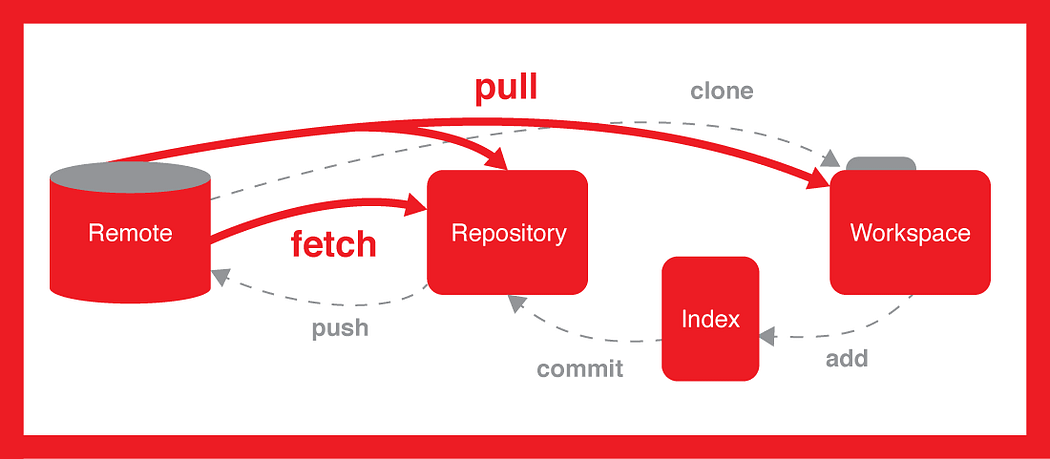
What git fetch Actually Does
When you run:
git fetch origin
Git:
Downloads new commits from the remote repository
Updates your remote-tracking branches (
origin/main)Does NOT touch your current working branch
Your code stays exactly the same.
Think of it as:
“Let me see what changed before I touch anything.”
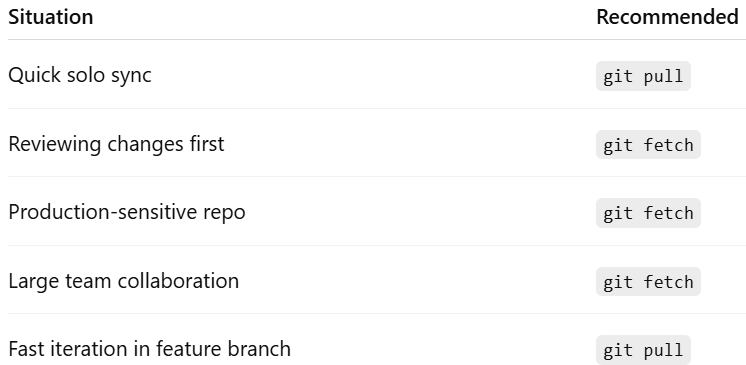
This makes git fetch ideal for:
Reviewing teammate changes
Safe DevOps workflows
Production-sensitive branches
Controlled merge strategies
What git pull Actually Does
When you run:
git pull origin main
Git performs:
git fetchgit merge(or rebase if configured)
This means:
Your local branch changes immediately
Merge commits may be created
Conflicts can appear instantly
Think of it as:
“Bring everything in and merge it now.”
That’s fast — but not always safe.
Why This Matters in DevOps
In real-world CI/CD environments, surprises are expensive.
Many experienced teams prefer:
git fetch
git diff origin/main
git merge origin/main
Why?
Because visibility before integration = fewer broken builds.
This is especially important when:
Working with multiple contributors
Managing protected branches
Deploying via automated pipelines
Handling microservices architecture
Small discipline in Git usage creates massive stability downstream.
When to Use What
The Mindset Shift
The real difference isn’t technical.
It’s psychological.
git fetch = Intentional workflowgit pull = Convenience workflow
Mature engineering teams optimize for control, not convenience.
If you’re serious about improving your Git workflow as a Developer or DevOps Engineer, mastering this distinction is foundational.
I wrote a more detailed practical guide with examples here:
Read the full breakdown:
https://medium.com/towards-aws/git-pull-vs-git-fetch-a-practical-guide-for-developers-and-devops-engineers-cc6766d68e6d
If you enjoyed this, consider subscribing.